Shared Counting Layer

A prep wizard became an activity record, and the redundant counting beneath it became shared infrastructure the whole back of house could trust.

role

Senior Product Designer

focus

Systems design and workflow architecture

platform

Enterprise desktop and tablet web

Overview

Restaurant365 gives restaurant operators a set of back-of-house tools that each manage their own workflow: prep, inventory, and purchasing. The prep sheet began as a three-step wizard. An operator counted on-hand quantities, reviewed the prep amounts the system calculated from them, and printed.

By the time I picked up the counting work, the team had set the direction with product: the prep sheet would become an activity record rather than a wizard, and counting would move underneath it as a shared capability, so one physical count could serve prep, inventory, and purchasing at once. That decision is the premise of this case, not its subject. My work was the counting experience the premise required, and in particular the signals that let an operator trust a shared count they did not take themselves.

The problem worth solving

A morning manager performed two to three separate counts, one for prep, one for inventory, and one for purchasing, frequently of the same items. On a combined template of roughly 75 items, that repetition represented about 50 redundant item counts in a single morning.

The counts could not share data. A prep count was saved only inside its own prep sheet record and never became a formal count, so inventory and purchasing could not use it. The same container of sauce was counted once for each workflow. A shared counting layer removes the duplication. A single count records each item once and exposes it to every workflow, and one walk of the building can combine templates that belong to different workflows, an inventory template and a purchasing template together, instead of a separate walk for each.

Starting a count. One session can combine templates from different workflows, here an inventory count and a purchasing order, so a single walk of the building serves both.

The trust problem and Count Age

Sharing a count introduces a problem the wizard never had. When prep forced its own count as step one, the number an operator prepped against was always one they had just taken. Once counting is shared, and once it is no longer mandatory, an operator is prepping against a number someone else may have recorded hours earlier.

Not forcing a count was a deliberate choice. We made it an optional template setting, defaulted off, because some locations trust their system numbers and a mandatory count adds friction for them. That choice is only safe if the age of a number is visible rather than silent, and making it visible became the center of the design.

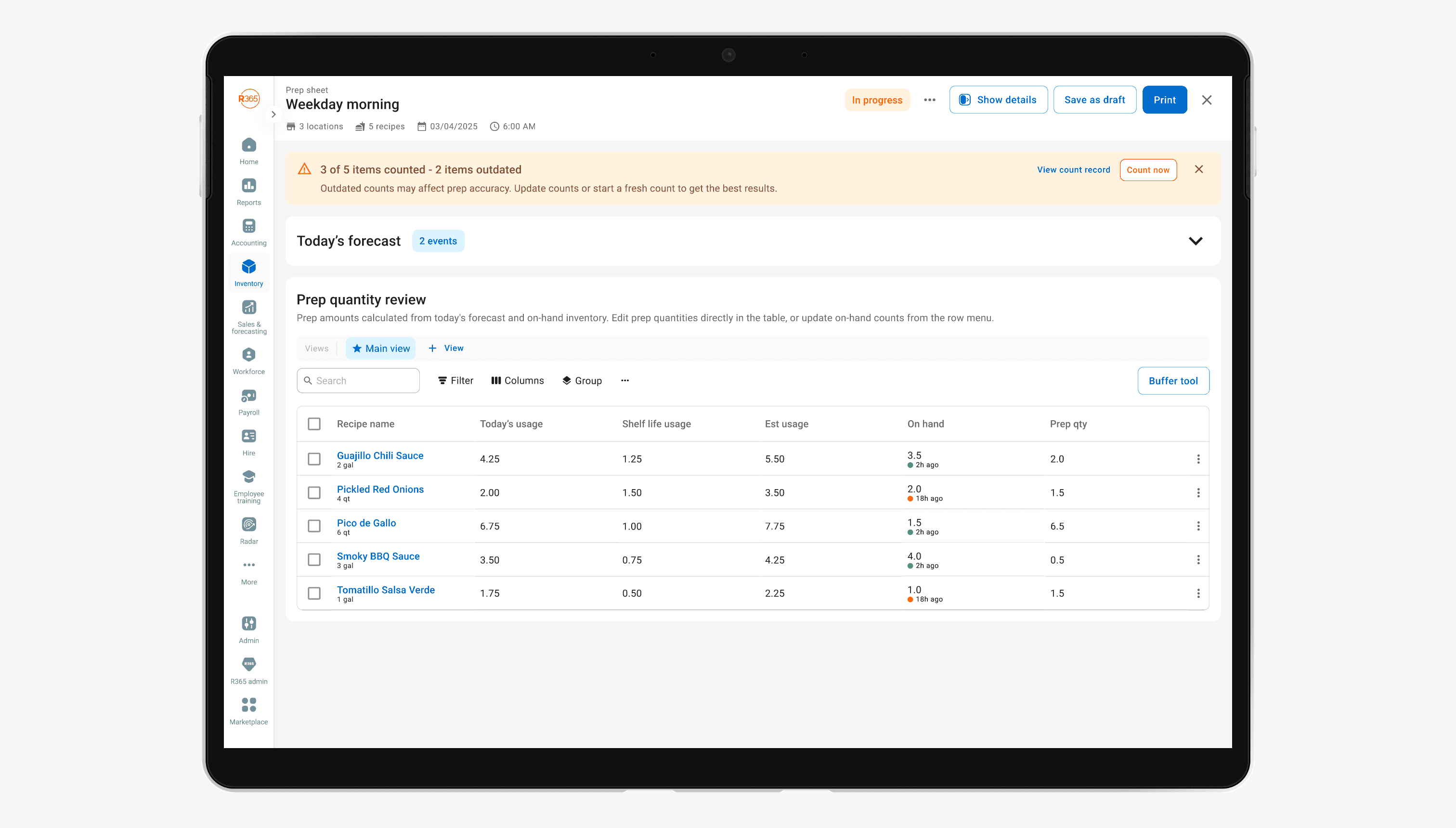
Count Age is the signal I built for it. Every on-hand value carries its own freshness, shown as a timestamp with a supporting color rather than a color alone, in three states: recent, aging, and stale. On the prep sheet an operator can see that two items were counted two hours ago and two others eighteen hours ago before deciding whether to prep against them or recount. A banner summarizes completeness at the top, for example three of five items counted with two outdated, and offers a fresh count without blocking anyone from continuing. The rejected alternative, a single colored dot, failed twice over: it said nothing about how stale a number was, and it carried its meaning in color alone, which is not accessible. Pairing a timestamp with color answered both.

The prep sheet as an activity record. The banner reports how many items are counted and how many have gone stale, and every on-hand value carries its own Count Age, recent in green and aging in amber.

Counting experience

The counting itself had to sit inside workflows an operator was already in. Clicking a row on the prep sheet opens a side panel that counts that one item by its individual units of measure. On-hand is never a number the operator types. It is calculated from the units, so the panel edits the units and the total follows. The cost is an extra layer, since an operator cannot overwrite an on-hand figure directly. In exchange the number stays internally consistent with the units it came from, which is what makes it safe to share downstream.

The larger call was where a count opens when it is triggered from inside another workflow. I evaluated four containers: a full-screen takeover, a side panel, a stacked dialog, and inline expansion in the source table. A quick count of four stale items and a full 75-item scheduled count are different tasks, so rather than force one container to serve both, I scoped the choice. A side panel handles small contextual counts, where the source sheet stays visible, and a full-screen count handles standalone and large ones. The tradeoff is real, and I named it in the spec. Two container behaviors have to be built and kept consistent, and a counting experience meant to feel shared risks looking different depending on where the operator entered it.

Counting an item without leaving the sheet. The side panel edits each inventory unit of measure, and on-hand stays a calculated total rather than a number anyone types.

Outcome

The work reached a beta rollout, with a cohort of customers identified and ready to receive it. My role was eliminated in an R&D restructuring before that beta launched.

What it produced is a counting layer an operator can trust without having taken the count. It is shared across prep, inventory, and purchasing, and honest about the age of every number it reports.